
Work sections
Click a section for details
UI System
Render pipeline extension, font atlassing, animation, and input management
UI System
Render pipeline extension, font atlassing, animation, and input management
Render Pipeline
All UI Textures are loaded into the renderer when the UI graphics pipeline gets initialized immediatley following the initialization of the descriptor sets for the UI pipeline.
Textures get cached onto the VulkanUIRenderer using their stripped file path as a key so the textures are easy to refer to specify in UI creation. The cache stores that key, as well as the position of the texture in the UIRenderer's texture array.
void LoadUITextures(entt::registry& registry, entt::entity entity) {

	auto& vulkanUIRenderer = registry.get(entity);

	for (const auto& file : std::filesystem::directory_iterator("../Textures/ui")) {

		std::string extension = file.path().extension().string();
		if (extension != ".png" && extension != ".jpg" && extension != ".jpeg") continue;

		std::string filePath = file.path().string();
		std::string key;
		MakeTextureKey(filePath, key);

		int textureId = CreateUITextureFromFile(registry, entity, file.path().generic_string());

		vulkanUIRenderer.textureCache[key] = textureId;
	}
}
The texture array uses UITexture structs which store information about the textures dimensions, the VkImage, VkDeviceMemory, VkImageView, VkSampler, and VkDescriptorSet.
struct UITexture {
	unsigned int width = 0;
	unsigned int height = 0;
	VkImage image = VK_NULL_HANDLE;
	VkDeviceMemory memory = VK_NULL_HANDLE;
	VkImageView imageView = VK_NULL_HANDLE;
	VkSampler sampler = VK_NULL_HANDLE;
	VkDescriptorSet set = VK_NULL_HANDLE;
	unsigned int textureId = 0;
};
When rendering, the UI pipeline is structed using UIDrawCmds, which stores details about the clip rect, what indices to use and offset, vertex offset, and the texture ID.
struct UIDrawCmd {
	VkRect2D clip;
	unsigned int indexCount;
	unsigned int firstIndex;
	unsigned int vertexOffset;
	unsigned int textureId;
};

/*UI Draw list gets passed through the pipeline each draw call
 to construct all elements that need to be drawn in a frame*/
struct UIDrawList {
	std::vector vertices;
	std::vector indices;
	std::vector drawCommands;
 };
Text Implementation
Text starts getting imported once all the "sprite" textures are loaded. Fonts are pulled from the game's Fonts folder, where they get passed to TrueType to make a font atlas out of. The font creation function will attempt to create a 512x512 font atlas - if that fails, it will increase the atlas size by a factor of 2 up to 4 times, failing if the required atlas would exceed 4096 x 4096.
bool CreateFontFromTTF(entt::registry& registry, entt::entity entity, const std::string& filePath,
                          float pixelHeight, DRAW::UIFont& outFont, int atlasWidth, int atlasHeight) {
	std::vector ttfBytes;
	if (!ReadFileBytes(filePath, ttfBytes)) return false;

	int width = atlasWidth;
	int height = atlasHeight;
	int bakedWidth = width;
	int bakedHeight = height;
	std::vector charAlphas;
	int bakedCount = 0;

	for (int attempt = 0; attempt < 4; attempt++) {

		charAlphas.assign(width * height, 0);

		bakedCount = stbtt_BakeFontBitmap(ttfBytes.data(), 0, pixelHeight, charAlphas.data(), width, height, UIFont::firstCharacter, UIFont::numberOfCharacters, outFont.bakedCharacters.data());

		if (bakedCount > 0) {
			bakedWidth = width;
			bakedHeight = height;
			break;
		}

		width *= 2;
		height *= 2;
	}

	if (bakedCount <= 0) return false;

	width = bakedWidth;
	height = bakedHeight;

	stbtt_fontinfo fontInfo{};

	if (!stbtt_InitFont(&fontInfo, ttfBytes.data(), stbtt_GetFontOffsetForIndex(ttfBytes.data(), 0))) return false;

	float scale = stbtt_ScaleForPixelHeight(&fontInfo, pixelHeight);

	int ascent, descent, lineGap;

	stbtt_GetFontVMetrics(&fontInfo, &ascent, &descent, &lineGap);

	tinygltf::Image image{};
	image.width = width;
	image.height = height;
	image.component = 4;
	image.bits = 8;
	image.image.resize(width * height * 4);

	for (int i = 0; i < width * height; i++) {
		unsigned char alpha = charAlphas[i];
		image.image[i * 4] = 255;
		image.image[i * 4 + 1] = 255;
		image.image[i * 4 + 2] = 255;
		image.image[i * 4 + 3] = alpha;
	}

	outFont.textureId = CreateUITextureFromImage(registry, entity, image, false);
	outFont.atlasW = width;
	outFont.atlasH = height;
	outFont.pixelHeight = pixelHeight;
	outFont.lineHeight = (ascent - descent + lineGap) * scale;
	outFont.ascent = ascent * scale;
	outFont.descent = descent * scale;
	return true;
}
The atlas gets uploaded to the GPU the same way that the sprite textures do. The texture ID, along with typography info like the line height, ascent, descent, and pixel height are put into a UIFont object. The UIFont also stores information on the first ASCII character to load from the font (char 32 'SP') and the number of characters to load (94, which loads to '~').
struct UIFont
{
	static constexpr int firstCharacter = 32;
	static constexpr int numberOfCharacters = 94;
	std::string filePath;
	unsigned int textureId = 0;
	int atlasW = 0;
	int atlasH = 0;
	float pixelHeight = 0.0f;
	float lineHeight = 0.0f;
	float ascent = 0;
	float descent = 0;
	std::array bakedCharacters{};
};
Whenever text is drawn in the UI, the text box has it's alignment rules evaluated for letter positioning, and then uses 'stbtt_GetBakedQuad' from TrueType to pull the UV details from the font atlas, then uses the stbtt_aligned_quad to draw a Quad native to the UIRenderer. One nice perk of this is that it allows text to be tinted easily, since the method of drawing normal quads already exposes a color parameter.
static inline void AddText(UIDrawList& drawList, UIFont& font, float2 position, Color color, Alignment alignment, const char* text) {
	TextBlockInfo textBlockInfo = CalculateTextBlockInfo(font, text);

	float topLeftX, topLeftY;
	switch (alignment.horizontal) {
	default:
	case HorizontalAlignment::LEFT:
		topLeftX = position.x;
		break;
	case HorizontalAlignment::CENTER:
		topLeftX = position.x - textBlockInfo.textBlockWidth * 0.5f;
		break;
	case HorizontalAlignment::RIGHT:
		topLeftX = position.x - textBlockInfo.textBlockWidth;
		break;
	}
	switch (alignment.vertical) {
	default:
	case VerticalAlignment::TOP:
		topLeftY = position.y;
		break;
	case VerticalAlignment::MIDDLE:
		topLeftY = position.y - textBlockInfo.textBlockHeight * 0.5f;
		break;
	case VerticalAlignment::BOTTOM:
		topLeftY = position.y - textBlockInfo.textBlockHeight;
	}

	float horizontalFactor = AlignFactor(alignment.horizontal);

	unsigned int combinedColor = PackRGBA8(color.r, color.g, color.b, color.a);

	int lineIndex = 0;
	float xPosition = topLeftX + (textBlockInfo.textBlockWidth - textBlockInfo.lineWidths[lineIndex]) * horizontalFactor;
	float yPosition = topLeftY + font.ascent;

	for (const char* currentChar = text; *currentChar; ++currentChar) {
		char character = *currentChar;
		if (character == '\r') continue;
		if (character == '\n') {
			lineIndex++;
			xPosition = topLeftX + (textBlockInfo.textBlockWidth - textBlockInfo.lineWidths[lineIndex]) * horizontalFactor;
			yPosition += font.lineHeight;
			continue;
		}

		if (character < font.firstCharacter || character >= font.firstCharacter + font.numberOfCharacters) continue;

		stbtt_aligned_quad quad{};

		stbtt_GetBakedQuad(font.bakedCharacters.data(), font.atlasW, font.atlasH, character - font.firstCharacter, &xPosition, &yPosition, &quad, 1);

		AddQuadUV(drawList, quad.x0, quad.y0, quad.x1, quad.y1, quad.s0, quad.t0, quad.s1, quad.t1, combinedColor);
	}
}
UI Element Animation
One of the most important things I wanted to tackle with the UI for this game was UI animation, that way UI could be much more dynamic than a typical arcade recreation. All UI animation is handled through "Track" structs, which represent an animation track for a single property of a UI element. Each track can have any number of keyframes assigned to it. The Lerp method is generic so that it's easy to extend to different properties.
template<typename T>
struct Track {
	std::vector<Keyframe<T>> keys;

	T Sample(float t) const {
		if (keys.empty()) return T{};
		if (t <= keys.front().t) return keys.front().value;
		if (t >= keys.back().t) return keys.back().value;

		for (int i = 0; i + 1 < keys.size(); i++) {
			const auto& key0 = keys[i];
			const auto& key1 = keys[i + 1];
			if (t >= key0.t && t < key1.t) {
				float span = (key1.t - key0.t);
				float percent = span > 1e-6f ? (t - key0.t) / span : 0.0f;
				return Lerp(key0.value, key1.value, percent);
			}
		}

		return keys.back().value;
	}
The currently implemented properties are the position, color, text, texture name, and extents (size) of a UI element. These are all stored on an "ElementAnimationTrack" struct which holds the id of the animated object, and all of it's sub-tracks. The ElementAnimationTracks for each element are then all added to an AnimationClip, which controls looping and other events firing.
struct UIAnimationEvent {
	UIAnimationEventType eventType = UIAnimationEventType::NONE;

	UIState newState = UIState::START_GAME;
	UICommand commandToRun = UICommand::NONE;
	bool flag = false;
	std::string data;
};

struct UIAnimationEventKeyframe {
	float t = 0.0f;
	UIAnimationEvent event;
};

struct ElementAnimationTrack {
	std::string id;
	Track pos;
	Track color;
	Track text;
	Track textureName;
	Track extents;
};

struct AnimationClip {
	float lengthSeconds = 0.0f;
	bool loop = false;
	std::vector animationTracks;
	std::vector events;
	std::string nextAnimationName;
};
The animator updates every frame, and iterates through the currently playing clip and it's element animation track. Any elements on screen that have a matching id get their properties modified by the Animator.
static inline void UpdateUIAnimator(entt::registry& registry, entt::entity entity, UI& ui, UIAnimator& animator, std::vector& elements, float dtSeconds, float2 windowDimensions) {
	if (!animator.currentlyPlayingClip) return;


	const AnimationClip& animationClip = *animator.currentlyPlayingClip;

	float previousTime = animator.currentTime;
	animator.currentTime += dtSeconds;
	float currentTime = animator.currentTime;

	FireClipEvents(registry, entity, ui, animationClip, previousTime, currentTime);

	float t = animator.currentTime;
	bool ended = false;

	if (animationClip.loop && animationClip.lengthSeconds > 0.0f) {
		while (t >= animationClip.lengthSeconds) t -= animationClip.lengthSeconds;
	}
	else {
		if (animationClip.lengthSeconds > 0.0f && t > animationClip.lengthSeconds) {
			t = animationClip.lengthSeconds;
			ended = true;
		}
	}

	for (const auto& animationTrack : animationClip.animationTracks) {
		UIElement* elementToAnimate = GetElementById(elements, animationTrack.id);
		if (!elementToAnimate) continue;

		if (!animationTrack.pos.keys.empty()) {
			RectTransform transform = animationTrack.pos.Sample(t);
			elementToAnimate->localTransform = animationTrack.pos.Sample(t);
		}
		if (!animationTrack.color.keys.empty()) elementToAnimate->color = animationTrack.color.Sample(t);
		if (!animationTrack.text.keys.empty()) elementToAnimate->text = animationTrack.text.Sample(t);
		if (!animationTrack.textureName.keys.empty()) elementToAnimate->textureName = animationTrack.textureName.Sample(t);
		if (!animationTrack.extents.keys.empty()) elementToAnimate->extents = animationTrack.extents.Sample(t);
	}

	if (ended && !animationClip.nextAnimationName.empty()) {
		float overflowSeconds = animator.currentTime - animationClip.lengthSeconds;
		SwitchToClip(animator, animationClip.nextAnimationName, overflowSeconds);
	}
}
The animator can also dispatch commands like enabling UI selection, activating buttons, play sounds, and changing the UI's current state (to switch it to another overlay).
static void DispatchUIAnimationEvent(entt::registry& registry, entt::entity entity, UI& ui, const UIAnimationEvent& event) {
	switch (event.eventType) {
	case UIAnimationEventType::PLAY_SOUND:
		AUDIO::playAudio(registry, event.data, 1.0f, 0.0f, 0.9f, 1.1f);
		break;
	case UIAnimationEventType::SET_UI_STATE:
		registry.emplace_or_replace(entity, UIStateChange{ event.newState });
		break;
	case UIAnimationEventType::RUN_COMMAND:
		RunCommand(registry, ui, event.commandToRun, event.data);
		break;
	case UIAnimationEventType::ENABLE_SELECTION:
		ui.uiSelector.enabled = true;
		break;
	case UIAnimationEventType::DISABLE_SELECTION:
		ui.uiSelector.enabled = false;
		break;
	case UIAnimationEventType::ACTIVATE_SELECTED:
		ActivateSelected(registry, ui);
		break;
	case UIAnimationEventType::CUSTOM:
		break;
	default:
		break;
	}
}
All interpolation is currently linear, though I'd love to revisit this system and add easing curves one day.
Input Handling
Selectable elements get a few more parameters when constructed. The important ones are the navigation ids and the "UICommand" to perform when selected.
static void BuildSelectableQuadElement(UI& ui, const char* id,
                                      RectTransform transform, float2 extents,
                                      Alignment alignment, Color color, const char* textureName,
                                      const char* parentId = "", uint8_t scaleFlags = UIElementScaleFlags::SCALE_ALL,
                                      UICommand command = UICommand::NONE, std::string commandContext = "",
                                      std::string up = "", std::string down = "",
                                      std::string right = "", std::string left = "")
{
	UIElement element{};
	element.id = id;
	element.type = UIElementType::QUAD;
	element.localTransform = transform;
	element.extents = extents;
	element.alignment = alignment;
	element.color = color;
	element.textureName = textureName;
	element.parentId = parentId;
	element.scaleFlags = scaleFlags;
	ui.uiElements.push_back(element);

	UISelectable selectable{};
	selectable.uiElementId = id;
	selectable.command = command;
	selectable.commandContext = commandContext;
	selectable.upId = up;
	selectable.downId = down;
	selectable.rightId = right;
	selectable.leftId = left;
	ui.uiSelectables.push_back(selectable);
}
The navigation ids are straightforward, they define the element id to move to when up, down, left, or right are pressed when an element is selected.
void MoveFocus(UI& ui, UIDirection direction) {
	UISelector& uiSelector = ui.uiSelector;
	UISelectable* currentSelection = GetSelectableById(ui.uiSelectables, uiSelector.currentlyFocusedId);
	if (currentSelection == nullptr) return;

	std::string nextSelectableId;
	switch (direction) {
	case UIDirection::UP:
		nextSelectableId = currentSelection->upId;
		break;
	case UIDirection::DOWN:
		nextSelectableId = currentSelection->downId;
		break;
	case UIDirection::LEFT:
		nextSelectableId = currentSelection->leftId;
		break;
	case UIDirection::RIGHT:
		nextSelectableId = currentSelection->rightId;
		break;
	}

	if (nextSelectableId.empty()) return;

	UISelectable* newFocusedSelectable = GetSelectableById(ui.uiSelectables, nextSelectableId);
	if (newFocusedSelectable != nullptr && newFocusedSelectable->enabled) {
		uiSelector.currentlyFocusedId = newFocusedSelectable->uiElementId;

		if (ui.nameEntry.active) {
			int slot = GetLetterSlotIndexFromId(uiSelector.currentlyFocusedId);
			if (slot != -1) ui.nameEntry.cursor = slot;
		}
	}
}
UICommands let the UI call to perform different actions on the rest of the game: things like starting the game, quitting, pausing, changing music, etc. Command behavior is all handled in the UISelector, which defines behavior for each of the commands. Selectable elements also get a context string in their constructor, which can be used for various command contexts like defining what music track to play, or which game state to switch to.
void CallStartGame(entt::registry& registry) {
	auto gameManagerView = registry.view();
	if (!gameManagerView.empty()) {
		entt::entity gameManager = *gameManagerView.begin();
		GAME::pressStart(registry, registry.ctx().get().gameConfig, gameManager);
		registry.emplace(gameManager);
	}
}

void CallQuitGame(entt::registry& registry) {
	registry.ctx().emplace();
}

void CallPause(entt::registry& registry, UI& ui) {
	bool isPaused = GAME::pauseFunction(registry);
}

void CallRespawn(entt::registry& registry) {
	auto gameManagerView = registry.view();
	if (!gameManagerView.empty()) {
		entt::entity gameManager = *gameManagerView.begin();
		GAME::respawn(registry, gameManager);
		SetUIState(registry, DRAW::IN_GAME);

	}
}

void CallSwitchGameState(entt::registry& registry, std::string newState) {
	auto uiView = registry.view();
	if (uiView.empty()) return;
	entt::entity uiEntity = *uiView.begin();
	UIState newUIState = UIState::START_GAME;
	if (newState == "preInGame" || newState == "PRE_IN_GAME") {
		newUIState = UIState::PRE_IN_GAME;
	} else if (newState == "highScoreEntry" || newState == "HIGH_SCORE_ENTRY") {
		newUIState = UIState::HIGH_SCORE_ENTRY;
	}
	registry.emplace_or_replace(uiEntity, UIStateChange{ newUIState });
}
Audio Engine
Implementation of SoLoud library for dynamic music + SFX. To listen to the music, click here!
Audio Engine
Implementation of SoLoud library for dynamic music + SFX. To listen to the music, click here!
Motivation for Implementation
For this project we were originally given Gateware to use for audio, but told we could switch to a different audio library if we liked. I ended up pivoting our audio from Gateware to SoLoud, since Gateware was limited in terms of audio and only allowed for simple play, pause, resume, and stop behaviors. I pushed for a more dynamic audio system and SoLoud has a much more expansive suite of tools for creating dynamic music, while still remaining lightweight.
Sound File Loading
The audio controller reads files from the music folder, where each subfolder is responsible for what I ended up calling a "Soundscape". Soundscapes store the individual music sections that apply to one section of the game. Each audio file in a folder has it's name parsed for a couple of features:
- 1. What section of the song is this (verse, chorus, A, B, etc.)?
- 2. How many bars long is this clip?
- 3. What is BPM of this clip?
- 4. What is the time signature of this clip?
- 5. Is this clip drums?
static ParsedStem ParseStemFromFile(const std::filesystem::path& file, MusicStemData defaults) {
	ParsedStem out;
	out.data = defaults;

	const std::string fileName = file.stem().string();
	const auto tokens = SplitDataTokens(fileName);

	bool section = false;
	bool bars = false;

	for (const std::string& token : tokens) {
		if (token == "drums" || token == "drum") {
			out.isDrums = true;
			continue;
		}

		int i = 0;
		double d = 0.0;

		if (ParseIntAfterPrefix(token, "sec", i) || ParseIntAfterPrefix(token, "s", i)) {
			out.section = i;
			section = true;
			continue;
		}
		if (ParseIntAfterPrefix(token, "bars", i) || ParseIntAfterPrefix(token, "b", i)) {
			out.data.bars = i;
			bars = true;
			continue;
		}
		if (ParseDoubleAfterPrefix(token, "bpm", d)) {
			out.data.bpm = d;
			continue;
		}

		int numerator = 0;
		int denominator = 0;

		if (ParseTimeSignatureToken(token, numerator, denominator)) {
			out.data.numerator = numerator;
			out.data.denominator = denominator;
			continue;
		}


	}

	if (out.data.bars <= 0) return out;
	if (!out.isDrums && !section) return out;

	out.valid = true;
	return out;
}
Most of the audio data consumed from the file name is responsible for determining when the next section of audio should play, and what the next section of audio should be, but files marked "drums" are dropped into another bucket entirely. This is the cheap and dirty way I decided to have the music dynamically match the intensity level of what's happening. By having the drums be a separate audio clip they can play on their own bus, which allowed me to throw a low pass filter on only that bus. With the drums pulled back with a low pass filter, it allows the game to feel less tense when there are no unkillable "Pursuer" enemies on the screen, and immediatley more tense when they arrive.
static inline void ProcessAudioFile(const std::filesystem::path& path, Soundscape& soundscape, MusicStemData& defaults) {
	if (!IsAudioExtension(path)) return;

	ParsedStem parsedStem = ParseStemFromFile(path, defaults);
	if (!parsedStem.valid) {
		std::cerr << "Skipping " << path.filename().string() << " could not parse data\n";
		return;
	}

	const std::string key = path.stem().string();

	if (parsedStem.isDrums) {
		soundscape.hasDrums = true;
		soundscape.drums = std::make_unique();
		soundscape.drums->section = -1;
		soundscape.drums->data = parsedStem.data;
		if (soundscape.drums->audio.load(path.string().c_str()) != SoLoud::SO_NO_ERROR) {
			std::cerr << "Failed to load drums: " << path.string() << "\n";
			soundscape.hasDrums = false;
			soundscape.drums.reset();
		}

		return;
	}

	auto stemPointer = std::make_unique();
	stemPointer->section = parsedStem.section;
	stemPointer->data = parsedStem.data;

	if (stemPointer->audio.load(path.string().c_str()) != SoLoud::SO_NO_ERROR) {
		std::cerr << "Failed to load stem: " << path.string() << "\n";

		return;
	}

	soundscape.sectionToStemKeys[parsedStem.section].push_back(key);
	soundscape.stems.emplace(key, std::move(stemPointer));
}
Adaptive Music Logic
Music starts when the StartActiveSoundscape function is called, which can specify which section of that soundscape to start on. Everytime a section is started, it first selects a section to play. It will pick randomly from all sections in the sound scape, ensuring not to repeat the same section more than twice. It then pulls a random clip for that section, making sure it's not the same one that is currently playing. That clip is then cued, and once started, the process repeats indefinitely.
void AudioController::StartSoundscape(int startSection, double clockSeconds) {
	if (activeSoundscape == nullptr) return;

	if (activeSoundscape->sectionToStemKeys.find(startSection) == activeSoundscape->sectionToStemKeys.end()) {
		startSection = activeSoundscape->sectionToStemKeys.begin()->first;
	}

	const double eps = 0.05;
	segmentStartTime = clockSeconds + eps;

	const int chosenSection = PickNextSection(startSection);
	const std::string key = PickStemForSection(chosenSection);
	lastStemKey = key;
	auto& stem = *activeSoundscape->stems.at(key);

	currentMusicHandle = musicBus.playClocked(segmentStartTime, stem.audio, 1.0f, 0.0f);
	currentSection = chosenSection;
	OnSectionPlayed(chosenSection);

	const double duration = CalculateSongDuration(stem.data.bpm, stem.data.numerator, stem.data.denominator, stem.data.bars);
	nextBoundaryTime = segmentStartTime + duration;

	if (activeSoundscape->hasDrums) {
		auto& drums = *activeSoundscape->drums;
		drumsLoopDuration = CalculateSongDuration(drums.data.bpm, drums.data.numerator, drums.data.denominator, drums.data.bars);

		drumsHandle = drumsBus.playClocked(segmentStartTime, drums.audio, 1.0f, 0.0f);
		drumsNextBoundryTime = segmentStartTime + drumsLoopDuration;
		drumsTargetCutoffHz = 17000.0f;
		drumsLowPassFilter.setParams(SoLoud::BiquadResonantFilter::LOWPASS, drumsTargetCutoffHz, 2);

	}
}
Other Rendering Work
PBR materials, skybox, and 2D sprite illustration
Other Rendering Work
PBR materials, skybox, and 2D sprite illustration
Materials with Albedo, Normal, Metallic and Roughness maps
In the last week of the project, I had mostly finished with everything I wanted to do regarding UI and Audio, and decided to try and upgrade the geometry render pipeline a bit to allow for albedo, normal, and roughness maps (since previously meshes only used vertex color).
The implementation is pretty dirty, but it opened up a lot of options in terms of varying objects' look. Textures are loaded into ModelTexture structs which store VkImage, VkDeviceMemory, and VkImageView. These are stored on the VulkanRenderer, and can be accessed through the texture cache using their file name as a key (similar to how the UI textures work).
static void BuildLevelTextureTable(entt::registry& registry, entt::entity entity, const std::string& textureRoot)
{
	auto* cpuLevel = registry.try_get(entity);
	if (!cpuLevel) return;

	auto& level = cpuLevel->levelData;

	InitializeTextures(registry, entity);

	if (level.levelTextures.size() != level.levelMaterials.size())
		level.levelTextures.resize(level.levelMaterials.size());

	for (size_t i = 0; i < level.levelMaterials.size(); ++i)
	{
		const H2B::MATERIAL& m = level.levelMaterials[i];
		auto& out = level.levelTextures[i];

		out.albedoIndex = 0;
		out.metalIndex = 1;
		out.roughnessIndex = 2;
		out.normalIndex = 3;

		if (m.map_Kd && *m.map_Kd) {
			std::string path = ResolveTexturePath(textureRoot, m.map_Kd);
			out.albedoIndex = CreateModelTextureFromFile(registry, entity, path, true);
		}

		if (m.bump && *m.bump) {
			std::string bumpFile = ExtractMtlTexturePath(m.bump);
			std::string path = ResolveTexturePath(textureRoot, bumpFile.c_str());
			out.normalIndex = CreateModelTextureFromFile(registry, entity, path, false);
		}

		if (m.map_Ks && *m.map_Ks) {
			std::string path = ResolveTexturePath(textureRoot, m.map_Ks);
			out.roughnessIndex = CreateModelTextureFromFile(registry, entity, path, false);
		}

		if (m.map_Ka && *m.map_Ka) {
			std::string path = ResolveTexturePath(textureRoot, m.map_Ka);
			out.metalIndex = CreateModelTextureFromFile(registry, entity, path, false);
		}
	}
}
Objects have their map_Kd (albedo), bump (normal), map_Ks (roughness), and map_Ka (metallic) written into the material file for by a Python exporter script for Blender (which is the primary modeling and level editing tool we used). When objects import, their material file is read, and since the material texture is already cached, the material itself has it's textures pulled straight from the cache on the VulkanRenderer.
void BuildMaterialSets(entt::registry& registry, entt::entity entity) {
	auto& vulkanRenderer = registry.get(entity);
	auto* cpuLevel = registry.try_get(entity);

	if (cpuLevel == nullptr) return;

	auto& level = cpuLevel->levelData;

	if (vulkanRenderer.materialSets.size() != level.levelMaterials.size()) return;

	InitializeTextures(registry, entity);

	if (level.levelTextures.size() != level.levelMaterials.size()) {
		level.levelTextures.resize(level.levelMaterials.size());
	}

	for (int matIndex = 0; matIndex < level.levelMaterials.size(); matIndex++) {
		auto texture = level.levelTextures[matIndex];

		VkImageView albedo = GetTextureImageView(texture.albedoIndex, vulkanRenderer);
		VkImageView normal = GetTextureImageView(texture.normalIndex, vulkanRenderer);
		VkImageView rough = GetTextureImageView(texture.roughnessIndex, vulkanRenderer);
		VkImageView metal = GetTextureImageView(texture.metalIndex, vulkanRenderer);


		WriteMaterialSet(vulkanRenderer.device, vulkanRenderer.materialSets[matIndex], albedo, normal, rough, metal, vulkanRenderer.materialSampler);
	}
}
The renderer already batches draw calls by model, so the quickest way to hook these new materials in was rebinding the material descriptor whenever the model being drawn is switched.
//Part of the VulkanRenderer component's Update call
std::map<GeometryData, int&rt::iterator iter;
int totalInstances = 0;
VkDescriptorSet boundMaterialSet = VK_NULL_HANDLE;
for (iter = geometryDataMap.begin(); iter != geometryDataMap.end(); ++iter) {
	const GeometryData& geometryData = iter->first;
	if (!vulkanRenderer.materialSets.empty()) {
		VkDescriptorSet materialDescriptorSet = vulkanRenderer.materialSets[geometryData.materialIndex];
		if (materialDescriptorSet != boundMaterialSet) {
			vkCmdBindDescriptorSets(commandBuffer, VK_PIPELINE_BIND_POINT_GRAPHICS, vulkanRenderer.pipelineLayout, 1, 1, &materialDescriptorSet, 0, nullptr);
			boundMaterialSet = materialDescriptorSet;
		}
	}
	vkCmdDrawIndexed(commandBuffer, geometryData.indexCount, iter->second, geometryData.indexStart, geometryData.vertexStart, totalInstances);
	totalInstances += iter->second;
}
Skybox
The skybox is also nothing fancy, it's just a large triangle that covers the entirety of the render space with a grid shader I wrote in Unity a year or so ago. I did expose a couple of parameters to the code for this shader that could be pushed as constants, those being the glow color of the grid in a float4 and the background color and current time of the renderer packed into another float4. While these were exposed with the intention that they could be dynamically updated, this never ended up getting used.
//During the VulkanRenderer's component Update call
vkCmdBindPipeline(commandBuffer, VK_PIPELINE_BIND_POINT_GRAPHICS, vulkanRenderer.skyboxPipeline);
SkyboxPush push = { {0.1,0.3,1,1} /*RGBA for the glow color of the background grid*/, {0,0,0.1,vulkanRenderer.timeSeconds} /*RGB for the background color of the grid, and the t of the renderer*/ };
vkCmdPushConstants(commandBuffer, vulkanRenderer.skyboxPipelineLayout, VK_SHADER_STAGE_FRAGMENT_BIT, 0, sizeof(SkyboxPush), &push);
vkCmdDraw(commandBuffer, 3, 1, 0, 0);
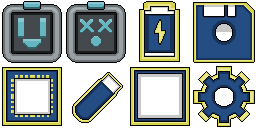
2D sprite work + material textures
I did all of the 2D sprites and textures for the game. Here are a couple of them!
Takeaways
Takeaways
Define more concrete rendering requirements, and stick to them
One thing I wish I would have done (and I'm sure our lead modeler would've wished we'd done as well) was define what we wanted for the render pipeline early into the process. He spent a lot of time working on models that had their detail expressed through separate meshes, allowing for separate colors. If instead we had planned on upgrading the render pipeline from the beginning, a lot of work could've been avoided in the modeling department.
More data driven structure for UI Layout / Animations
Another thing that I would've done differently is invest in driving UI layout through data. While the system of manually building states and animations in code worked - and I believe the correct choice for the amount of time we had - UI layouts and animations driven by JSON files or another more data driven approach would make the project far more maintainable and extensible in the future.